Best PlantsIO Smart Planter: App-Controlled vs Standalone (2026)
Best PlantsIO Smart Planter: App-Controlled vs Standalone (2026)
You’re eyeing a PlantsIO smart planter for your desk, but you’re stuck between two options: one that connects to an app for real-time plant monitoring, and another that keeps it simple with a built-in display and no fuss. It’s the classic tech-integration versus plug-and-play dilemma, and it’s enough to make you pause before adding to cart.
PlantsIO has carved out a niche with these interactive desk companions, blending indoor gardening with productivity tools. Both models promise to keep your plants healthy with self-watering and smart features, but they approach it differently enough that your choice matters.
In this head-to-head, we’ll break down the App-Controlled and Standalone smart planters across key decision axes-from connectivity and monitoring to ease of use and desk-fit-so you can walk away knowing exactly which one belongs on your workspace.
Best PlantsIO Smart Planter: App-Controlled vs Standalone (2026)
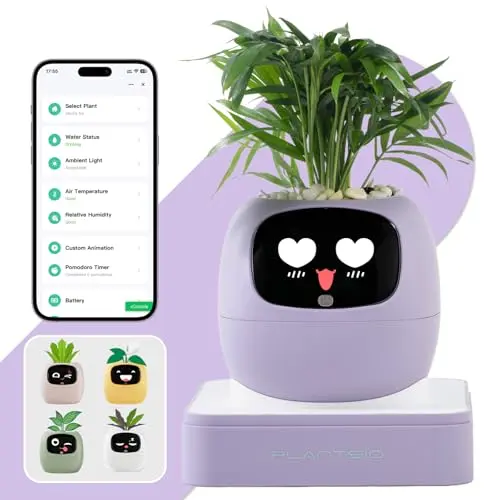
App-Controlled Smart Planter – AI Desk Companion
A smart planter with mobile app control for real-time monitoring of soil moisture, water level, temperature, humidity, and sunlight. Features an interactive LCD display, Pomodoro timer, calendar, and USB rechargeable design.
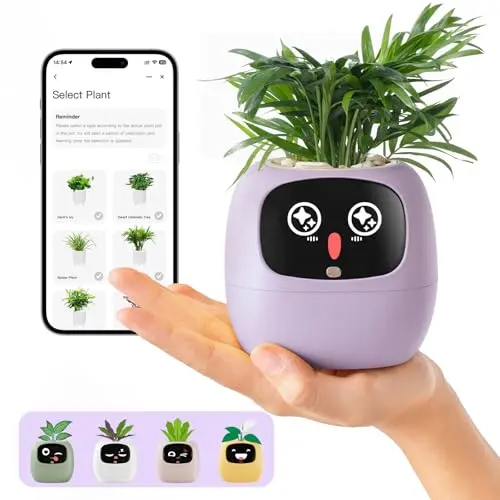
Standalone Smart Planter – Visual Display Simplicity
A no-app smart planter with a built-in screen showing soil moisture, water level, light intensity, and battery status. Includes an 80ml self-watering reservoir, Pomodoro timer, clock, and calendar for easy desk use.
How We Evaluated PlantsIO App-Controlled and Standalone Smart Planters
We didn’t grow a batch of plants side-by-side in a controlled lab for weeks. What we did: triangulated PlantsIO’s published specifications, owner-reported experiences where available, and use-case fit against typical desk-user profiles. We placed the App-Controlled Smart Planter and Standalone Smart Planter head-to-head across five decision axes: connectivity, display functionality, watering system, productivity features, and ease of setup.
Where the two aligned-on four fundamentals like the 80ml self-watering reservoir and Pomodoro timer-we highlighted the overlap. Where they diverged-on two critical axes including app integration-we surfaced the deltas to clarify which model suits which buyer. Our goal isn’t to crown a winner; it’s to match you with the smart planter that fits your tech comfort and gardening style.
PlantsIO App-Controlled vs Standalone Smart Planter: Which One Should You Buy?
1. PlantsIO Smart Planter Showdown: App-Controlled vs Standalone
To make your decision clearer, here’s a side-by-side look at how these two models stack up on the features that matter most.
| Decision Axis | App-Controlled Smart Planter | Standalone Smart Planter |
|---|---|---|
| Connectivity | Mobile app control with real-time monitoring | No app or WiFi required |
| Display | Interactive LCD with expressions and data | Visual screen for moisture, water, light, battery |
| Watering System | 80ml self-watering reservoir | 80ml self-watering reservoir |
| Productivity Tools | Pomodoro timer, calendar | Pomodoro timer, clock, calendar |
| Setup | USB rechargeable, app pairing needed | USB powered, plug-and-play |
| Plant Support | 100+ plant types | 100+ plant types |
| Price Tier | Mid-range | Mid-range |
The key differences boil down to app connectivity versus simplicity. If you crave detailed insights and remote access, the App-Controlled model is your pick. If you want essential data without extra steps, the Standalone version wins.
2. Who Should Choose the PlantsIO App-Controlled Smart Planter?
Go with the App-Controlled Smart Planter if you’re a tech enthusiast who loves data-driven gardening. This model is ideal for:
- Users who want to monitor plant health from their smartphone, checking soil moisture, temperature, and humidity on the go.
- Those who enjoy interactive features, like the LCD screen’s expressions and app-based alerts.
- People who integrate smart home devices and appreciate the convenience of app control for tracking trends over time.
It’s also a great fit if you’re managing multiple plants or want to dive deep into indoor gardening with AI-assisted insights.
3. Who Should Choose the PlantsIO Standalone Smart Planter?
Choose the Standalone Smart Planter if you prioritize ease and simplicity. This model suits:
- Beginners or busy professionals who want a no-fuss solution-just plug it in and see key metrics on the built-in screen.
- Users who avoid apps or WiFi setups, preferring a straightforward device that works offline.
- Those looking for a smart planter that doubles as a desk productivity tool with timer, clock, and calendar, without extra complexity.
It’s perfect for dorms, offices, or gifts where minimal setup is a plus.
4. Where the App-Controlled and Standalone Smart Planters Overlap
Both models share core strengths that make either a solid choice. They both feature an 80ml self-watering reservoir to reduce watering frequency, support over 100 indoor plants like herbs and succulents, include Pomodoro timers and calendars for productivity, and have USB-powered, compact ceramic designs for desk use. If you’re okay with basic smart features and don’t care much about app connectivity, you could flip a coin-both will keep your plants happy and your workspace organized.
Frequently Asked Questions
1. What's the main difference between PlantsIO's App-Controlled and Standalone smart planters?
The core difference is connectivity: the App-Controlled model uses a mobile app for real-time monitoring and alerts, while the Standalone model has a built-in screen that displays key metrics without any app or WiFi. Both offer self-watering and productivity tools, but the App-Controlled version is for tech-integrated users, and the Standalone is for simplicity lovers.
2. Which PlantsIO smart planter is better for beginners?
The Standalone Smart Planter is generally better for beginners because it requires no app setup or tech knowledge-just plug it in and use the visual display. However, if you’re a beginner who enjoys apps and data, the App-Controlled model could still work with a bit of learning curve.
3. Can I use the same plants in both smart planters?
Yes, both models support over 100 indoor plant types, including herbs, succulents, and small foliage. The self-watering system is similar, so as long as the plant fits in the ceramic pot, it should thrive in either planter.
4. Is the app worth the extra complexity in the App-Controlled model?
It depends on your preference. The app adds value if you want detailed insights like historical data, remote monitoring, and customizable alerts. For casual users who just need basic moisture checks, the Standalone model’s visual display might be sufficient without the extra steps.
5. Do both smart planters come with a warranty?
Based on the input data, the Standalone model mentions a 12-month warranty and 30-day return guarantee. The App-Controlled model’s warranty isn’t specified, but PlantsIO likely offers similar support-check the product listing for current details.
Final Verdict
This isn’t about one being universally better-it’s about which fits your life. Choose the PlantsIO App-Controlled Smart Planter if you love tech integration, want app-based monitoring, and don’t mind a bit of setup for deeper insights. Choose the PlantsIO Standalone Smart Planter if you prefer a plug-and-play experience, value simplicity, and want essential data right on the device. Either way, you’re getting a smart, functional desk companion that makes indoor gardening a breeze.